PERSONAL FINANCE, MADE SIMPLE
Your Money. Your Direction.
Take control of your finances. Privately.
Meet Montra — your personal finance companion that helps you track expenses, manage budgets, plan upcoming payments, and build better money habits. No bank connection. No mandatory account. Your financial records stay on your device.
App StoreComing soon on
Google Play
- Privacy-first by design
- No bank connection required
- iOS and Android
- Free to get started
Know where your money goes. Plan where it goes next.
From everyday purchases to upcoming bills and savings targets, Montra helps you understand your money without handing over your banking credentials.
FEATURES
Everything you need to take control of your money.
Smart Financial Dashboard
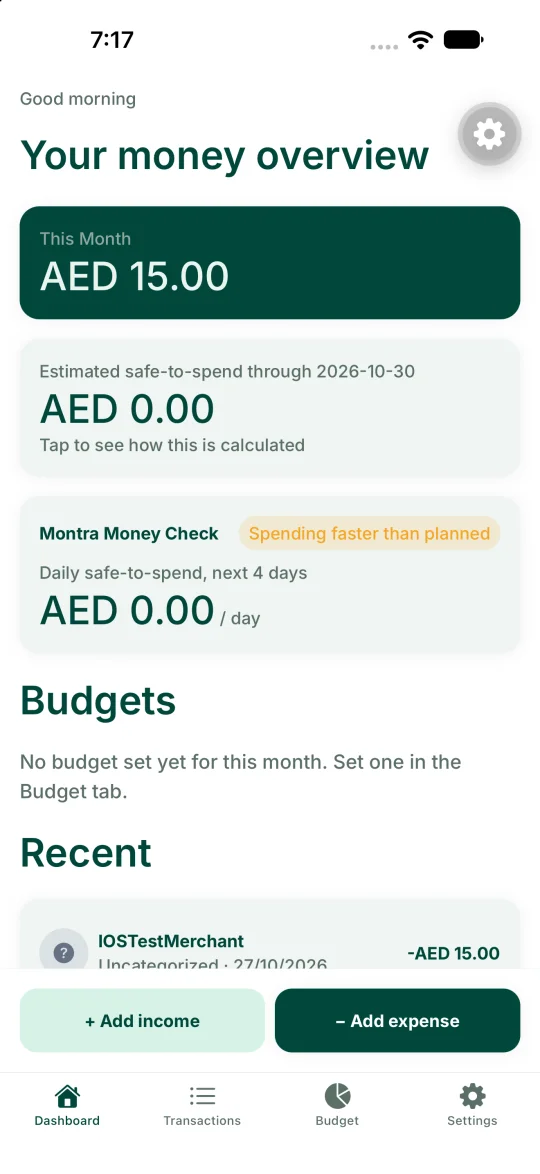
Monitor spending, account balances and your estimated safe-to-spend amount.
Effortless Expense Tracking
Record income and expenses, organize transactions by category and review your spending.
Budgets That Keep You on Track
Set monthly limits, see progress and get helpful spending alerts with Montra Pro.
Savings Goals That Motivate You
Set a goal and track each contribution toward it with Montra Pro.
Never Miss an Important Payment
Organize rent, utilities, salary and subscriptions with optional local reminders in Pro.
Import Your Transactions
Import compatible CSV bank statements with column mapping and duplicate detection in Pro.
Manage Multiple Accounts
Track cash, bank and card wallets with running balances.
Android Notification Capture
Optional supported transaction-alert capture processed on-device, subject to permissions and platform limitations.
APP SCREENS
Simple. Beautiful. Powerful.
A clean and intuitive interface to help you track, plan and achieve your financial goals.
Dashboard
See your financial position at a glance.
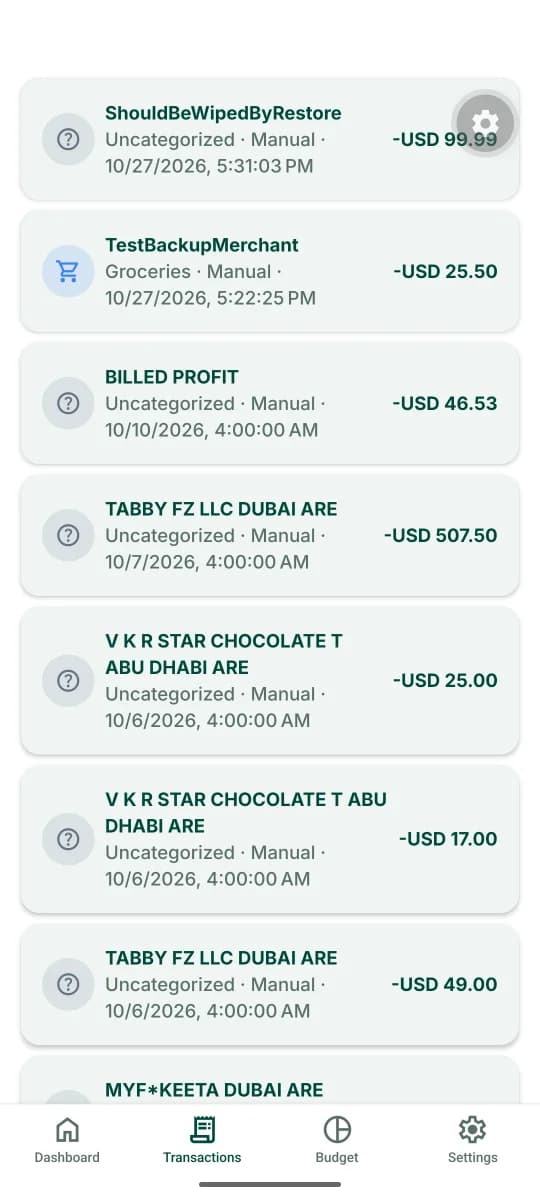
Transactions
Easily track and categorize your expenses.
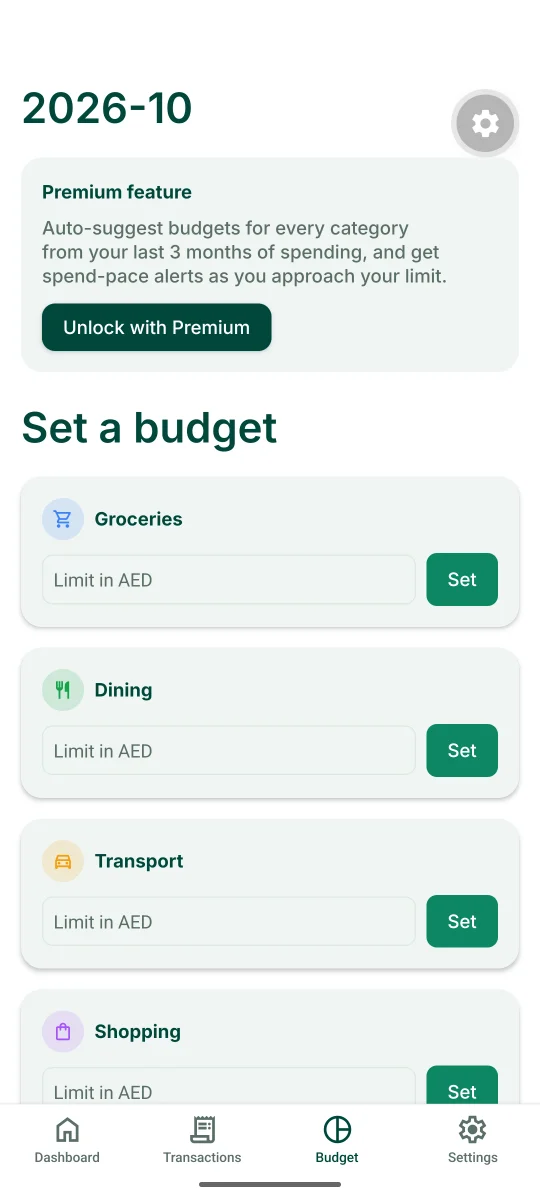
Budgets
Set limits and get spend-pace alerts.
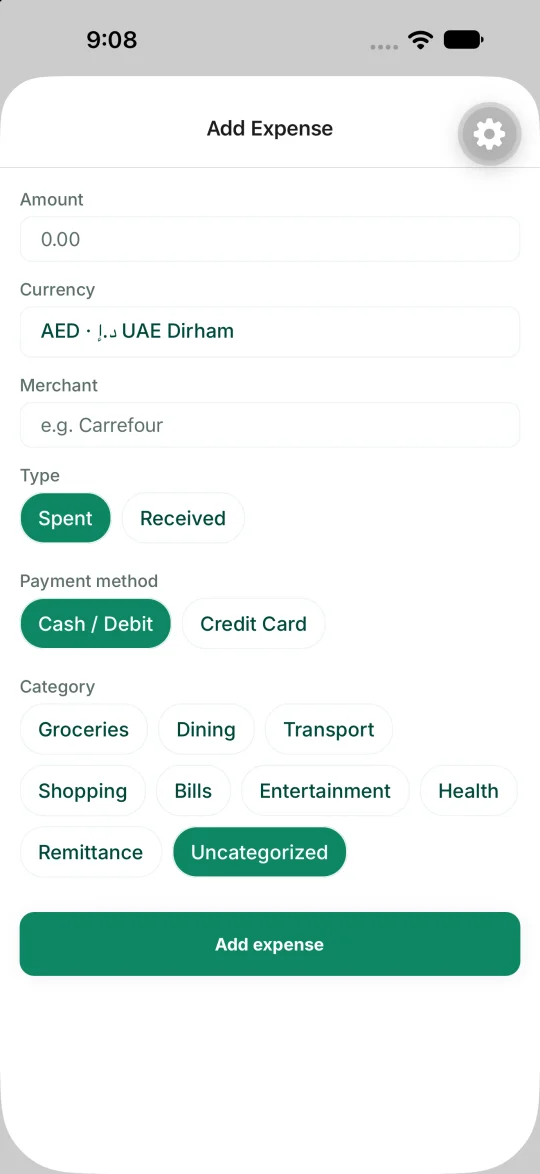
Add Expense
Log spending in a few taps, with smart categories.
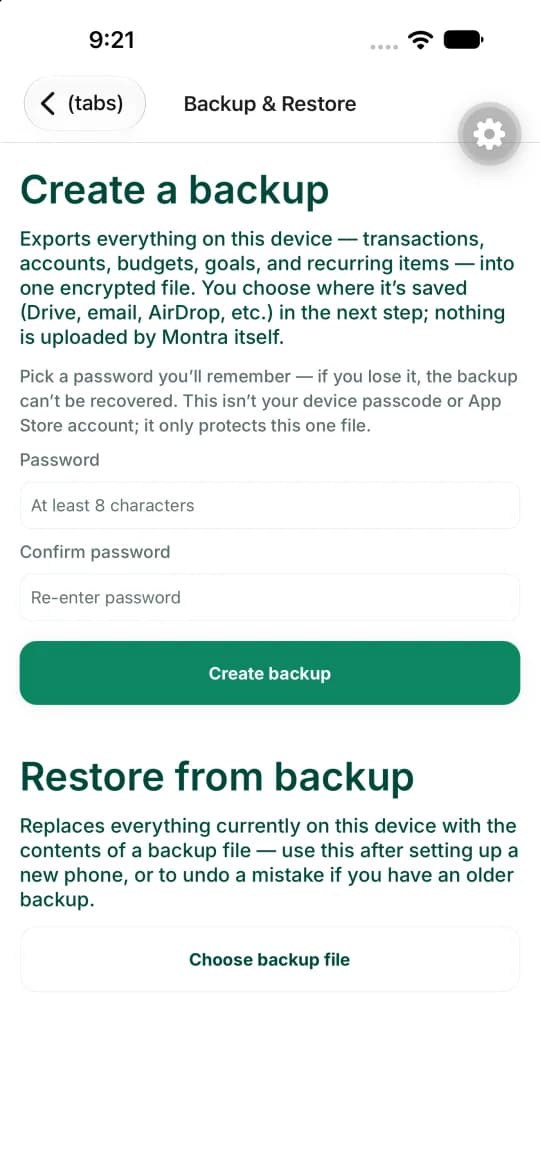
Backup & Restore
Export an encrypted copy of your data, anytime.
How it works
- 1
Add your accounts
Set up your cash, bank and card wallets.
- 2
Record or import
Add transactions manually; Pro can import compatible CSV statements.
- 3
Understand and plan
Review spending, check estimated safe-to-spend, and use Pro budgets, goals and reminders.
PRIVACY FIRST
Your money is personal. Your data should be too.
Montra does not require a bank connection or a Montra account. Your financial records are stored locally on your device, not in a Montra-operated cloud database.
Read Our Privacy Policy →- No bank credentials
- Local SQLite financial records
- Optional Android notification capture
- Export your data
Device backups, operating-system sharing, app-store billing, and any installed third-party SDKs may have separate data handling. See the Privacy Policy for details — we don’t claim that nothing ever leaves your phone.
PRICING
Start free. Upgrade when you are ready.
Free
Perfect to get started
Free
Forever
- Unlimited manual transactions
- Dashboard with safe-to-spend estimate
- Up to 2 accounts
- 1 category budget
- 1 savings goal
- CSV export
Montra Pro
Unlock your full potential
$2.99 / month
or $24.99 / year (save 30%)
Estimated price for your region — see the App Store or Google Play listing for the exact price at checkout.
- Everything in Free
- Unlimited accounts, budgets and goals
- Budget alerts and suggested limits
- Income target tracking
- Separate credit card spending
- Recurring items with local reminders
- CSV import with mapping and duplicate detection
READY TO TAKE CONTROL?
A clearer financial future starts with understanding today.
Track spending, plan ahead and take control — all with privacy at the center.
App StoreComing soon on
Google Play

Frequently asked questions
Do I need to connect my bank?
No. You can enter transactions manually or import supported CSV statements with Pro.
Do I need to sign up?
No Montra account is required for core functionality.
Where is my financial information stored?
In the app's local database on your device. See the Privacy Policy for device backups and sharing.
Does Montra work offline?
Core tracking works locally; app-store purchase validation and certain platform services may require internet access.
Can Montra automatically read iPhone banking notifications?
No. iOS generally prevents third-party apps from reading other apps' notifications or SMS inboxes.
What happens if I lose my phone?
Locally stored records may be lost unless you have an available backup or export.
How do I cancel Pro?
Manage subscriptions through your Apple or Google account.
Is Montra financial advice?
No. Its estimates are planning aids, not regulated financial advice.